INOBITEC PRO

Dynamically progressive edition with Extended functionality

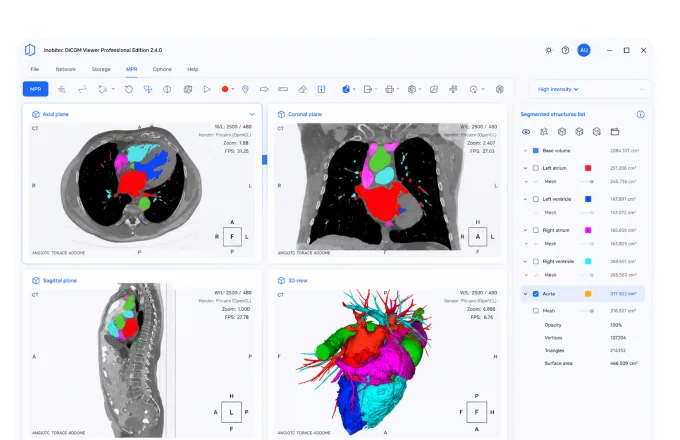
Inobitec Pro is the dynamically progressive edition of the Inobitec DICOM Viewer, offering extended functionality for advanced 3D reconstruction, multi-planar reconstruction, virtual endoscopy and a comprehensive set of analysis modules.

Highlights

  • Advanced 3D Reconstruction
  • Export surfaces in OBJ, STL, PLY, GLB formats
  • Advanced multi-plan reconstruction
  • Adding Markers and Marker Lines
  • Combining Series with Advanced Tools
  • Virtual endoscopy with various options
  • Recording video from viewports (64-bit builds only)
  • Embedded Inobitec Web DICOM Viewer
  • Ability to activate additional modules (Listed Below)

PET / CT analysis module

  • Positioning a 3D model in a MIP window
  • Automatic setting of CLUT and WL
  • 3D MIP for PT Series
  • VOI Tool
  • One-click tool
  • Manage multiple tools at once
  • 2D MIP for CT-series with the ability to change the thickness of the cut
  • Switching between Mono PET, Mono CT, PET-CT
  • Setting the default color table for MIP
  • Image navigation, mirroring, magnifying, PET export options

Coronary Arteries analysis module

  • Calcium Scoring
  • Analysis of transverse sections of coronary vessels to determine the boundaries of the lumen of the vessel and the boundaries of the outer wall
  • Classification of tissue in the vessel wall: fat / calcium / fibrosed tissue
  • Isolation of the portion of the vessel for analysis, display of the color of classified tissues
  • Automatic search for the bottleneck in the selected section
  • Display the length of the selected section and the distance to it from the mouth of the vessel

Vessel analysis module

  • Algorithm for automatically determining the center line of a vessel
  • Algorithm and interface for semi-automatic and manual editing of the center line of the vessel
  • Algorithm for automatic analysis of transverse sections of a vessel to determine the area, as well as the minimum and maximum diameters
  • Interface for working with the scan of the vessel, including the choice of cross sections and their display
  • Automatic display of percent stenosis based on selected reference and working sections

Cardiac function analysis module

  • Building contours for the left and right ventricle manually
  • Building contours for the left ventricle automatically
  • Evaluating the main parameters for the left and the right ventricle (EDV, ESV, SV, EF, CO, CI, myocardial mass)
CONTACTS

Contact Us

For any Medical Imaging Solution requirements - RIS, PACS, Teleradiology, VNA, Ultrasound, Structured Reporting & Endoscopy Image Management, Recording & Live Streaming, Cloud Solutions, C-Arm Memory, Patient Portal, 3D Solutions, Advanced Visualization, and many more.

Get in Touch

+91-9881495351/52

sales@medsynaptic.com

Chat With Us

+1 (800) 123-4567

usa@medsynaptic.com

Chat With Us

+971 4 123 4567

uae@medsynaptic.com

Chat With Us